Two ways
You can let the NVR detect motion on the stream, or let Screen2ipcam tell the NVR when the screen changes, using ONVIF motion events.
Screen2ipcam motion events
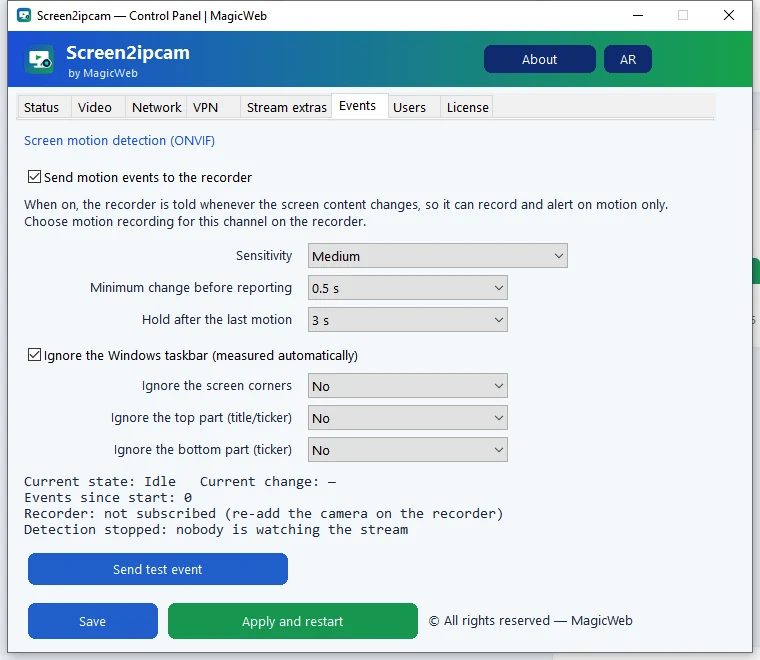
- Open the control panel and go to the Events tab.
- Tick Send motion events to the recorder and choose a sensitivity.
- Press Apply and restart.
- Re-add the camera on the NVR once, so it subscribes to the events.
- Set the channel recording to motion.
NVR motion detection
Alternatively, enable motion detection on the channel in your NVR (on the sub stream if it offers that) and choose motion recording.
Try it on your own NVR14-day full trial · $20 one-time per PC · free edition on the Microsoft Store
Download free trialFAQ
Which way is better?
Screen2ipcam events react to real screen changes and ignore camera-style noise. NVR detection works too if your recorder does not use ONVIF events.
Do I need to re-add the camera?
Yes, once, after turning events on, so the NVR subscribes to them.